SAGALITH / Fantasy map maker
A fantasy map maker connected to your lore
Plan the realm, review the artwork and give every pin a story. Create an AI-assisted fantasy map or bring your own image into the Atlas.
Every tool included. Free exports on every plan.
Plan the geography before painting it
The map creator begins with a description of the world and proposes places as text. This gives you a chance to review the geography before spending credits on map artwork. Think about the journey your story needs: the starting port, the destination and the barrier between them.
A useful prompt describes the scale, terrain and a few important landmarks. For example: 'An island coast with three rival harbors, a mountain spine and one pass connecting the northern valley to the sea.' Avoid asking for dozens of precisely labeled settlements in the first image.
Review the image and place your pins
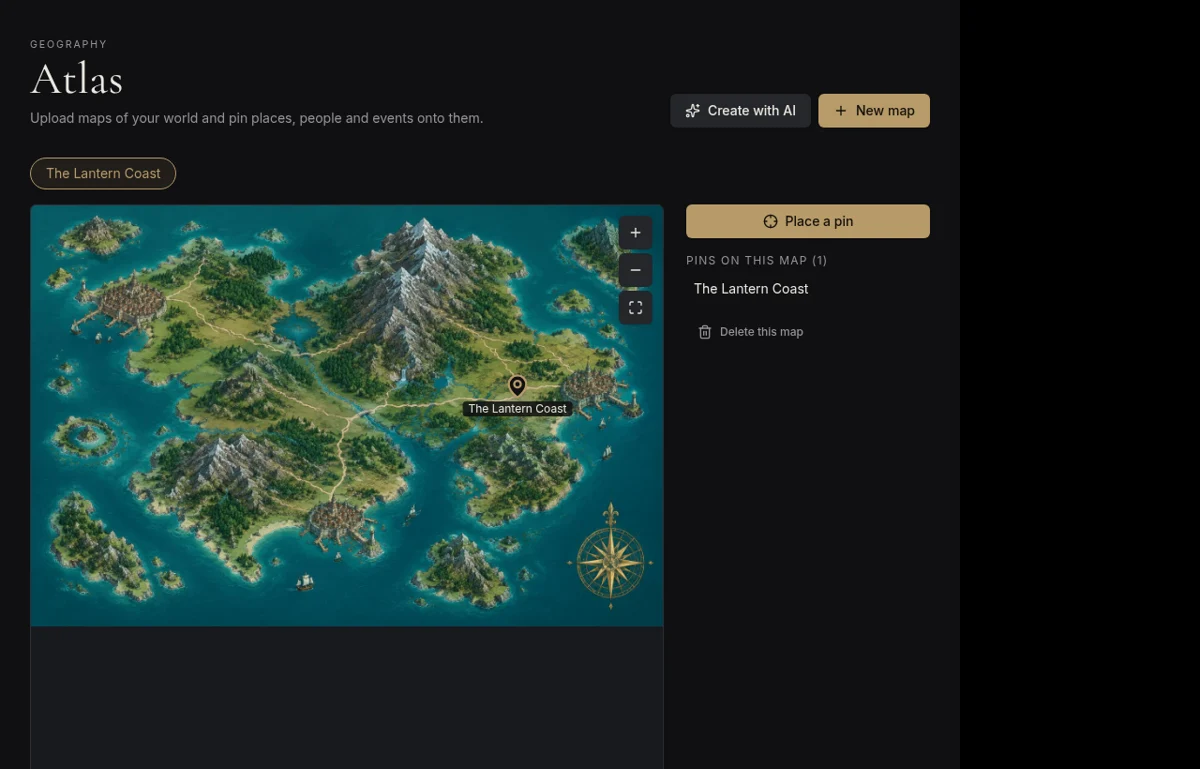
AI map artwork is a visual starting point, not a survey. Check coastlines, rivers and routes yourself. Review proposed pins and align them to the actual artwork before saving, rather than assuming that generated coordinates match every landmark.
Once in the Atlas, a pin can link to an archive entry. A harbor can open its location profile; a ruin can point to its history. Pins are stored relative to the image, so they stay aligned when you zoom or view the map at another size.
- Check whether the route supports the events in your story.
- Move pins to the intended places before saving.
- Keep detailed names and lore in linked entries.
Use your own map instead
You can upload an existing map image and add pins without AI painting. That is useful if you already drew a map by hand or made one in another mapping tool. SAGALITH's Atlas adds the connection between that image and your world archive.
For a campaign, publish selected lore entries for your players and keep unrevealed material private. The Atlas remains part of your workspace; publishing a wiki entry does not mean every private map or note becomes public. Text planning and painting use different AI credit amounts; consult current pricing before generating.
Your first three steps
- 01
Describe the region and the journey it needs to support.
- 02
Review the proposed places and optionally generate map artwork.
- 03
Align pins with the image, link the relevant entries and save your map.
Before you begin
Is AI map generation unlimited on free?
No. Every tool is included, but AI generation uses the monthly credit allowance. Uploading an existing image and organizing its pins does not require AI painting.
Is this a manual terrain-drawing tool?
SAGALITH focuses on AI-assisted map artwork, uploaded images and linked pins. It is not a brush-based terrain editor; you can create artwork elsewhere and upload it.